

Authentication scopes —
accounts:admin,businesses:admin,checks:admin,roles:admin,users:admin,taxes:adminFor more information, refer to Authentication scopes.
This section explains how to create a business account for sole traders. For information on business accounts for larger businesses and corporations, refer to the Create a corporate business account section.
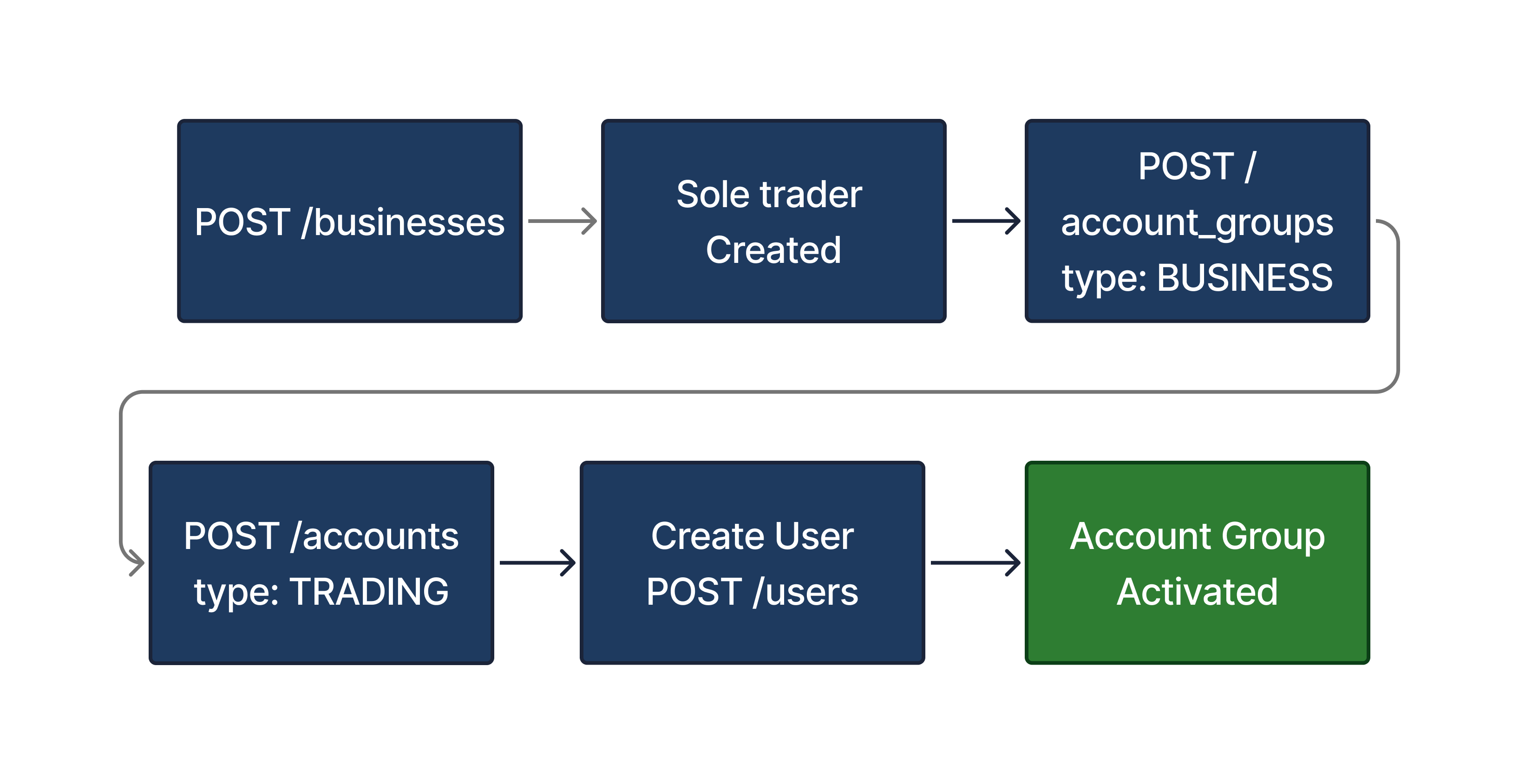
Clients must use the /businesses endpoint to create a new sole trader entity in addition to the user entity. This additionally includes all tax and identity information related to the individual’s incorporation.
POST /businesses
{
    "contact_email": "acme.corporation@example.com",
    "registered_address": {
        "address_line1": "110",
        "address_line2": "Schonhauser Allee",
        "postcode": "101110",
        "city": "Berlin",
        "state": "BE",
        "country": "DE"
    },
    "registration_number": "111221111",
    "tax_information": {
        "tax_country_code": "DE",
        "tax_identification_type": "STEUERNUMMER",
        "tax_identification_number": "12345678901",
        "is_resident_in_multiple_tax_jurisdictions": false,
        "is_subject_to_fatca": false
    },
    "business_type": "SOLE_TRADER",
    "identification": {
        "company_name": "Max Mustermann - Web Design",
        "incorporation_date": "2000-10-10",
        "legal_designation": "EINZELUNTERNEHMER"
    },
    "terms_and_conditions": {
        "consent_document_id": "6a163d14-5b3d-48be-ac90-43314e96be71",
        "confirmed_at": "2024-10-24T14:14:22Z"
    },
    "data_privacy_and_sharing_agreement": {
        "consent_document_id": "fa2227c3-2b29-47e1-84da-996d09517edc",
        "confirmed_at": "2024-10-24T14:16:22Z"
    }
}
The table below shows the related parameters and their descriptions.
| Parameter | Required | Description |
|---|---|---|
contact_email | Required | Contact email address of the sole trader. |
registered_address | Required | The official, registered address of the sole trader. |
registration_number | Optional | The registration number of the sole trader as listed in the commercial registry. |
tax_information.tax_country_code | Optional | Accepted country code as listed in ISO 3166-1 alpha-2 code. For Germany, this value equals "DE". |
tax_information.tax_identification_number | Optional | Tax identification number of the business. For Germany, this equals the USt-ID / Umsatzsteuer-ID. |
tax_information.is_resident_in_multiple_tax_jurisdictions | Optional | Indicates if the sole trader is resident in multiple tax jurisdictions. At this time, business accounts are only available for entities resident in a single tax jurisdiction. |
tax_information.is_subject_to_fatca | Optional | Indicates if the sole trader is subject to FATCA regulations. At this time, business accounts are only available for entities that are not subject to FATCA regulations. |
business_type | Required | The official, registered type of business. Currently we support the following: - SOLE_TRADER: In Germany, this applies to Einzelunternehmen. - LIMITED_LIABILITY_COMPANY: In Germany, this applies to the following: Gesellschaft mit beschränkter Haftung (GmbH) Unternehmergesellschaft (UG). Aktiengesellschaft (AG). For instructions to onboard corporate corporate entities, refer to the Creating corporate business accounts section. |
data_privacy_and_sharing_agreement.consent_document_id | Optional | The universally unique identifier (UUID) of the data privacy and sharing agreement document. |
data_privacy_and_sharing_agreement.confirmed_at | Optional | The timestamp when the data privacy and sharing agreement was confirmed. |
terms_and_conditions.consent_document_id | Optional | The universally unique identifier (UUID) of the consent document. |
terms_and_conditions.confirmed_at | Optional | Timestamp when the terms and conditions were confirmed. |
The process for creating a business entity for a sole trader and its lifecycle goes through the following statuses.
| Status | Description |
|---|---|
| INACTIVE | The sole trader’s approval is pending. The sole trader entity is visible via our API but cannot be processed. |
| ACTIVE | The sole trader is active. Their account groups can be funded and can accept orders once the required roles are active. For more information, refer to Role-based activation. |
| OFFBOARDING | The offboarding process has started. The sole trader remains in this status until there are no open account groups and no pending regulatory reporting (e.g., annual tax statements). |
| OFFBOARDED | The sole trader is offboarded. The sole trader’s record can be kept for the regulatory period. |
You can listen to the Business events webhook for the BUSINESS.CREATED message which provides confirmation that the business was successfully created.
{
  "id": "2df83681-6a42-4837-a554-a8197335bcfa",
  "created_at": "2021-11-22T09:04:42Z",
  "type": "BUSINESS.CREATED",
  "object": {
    "id": "a9a72268-4f3c-4de2-abb9-a553a3bb7608",
    "created_at": "2024-10-24T14:14:22Z",
    "updated_at": "2024-10-24T14:14:22Z",
    "contact_email": "acme.corporation@example.com",
    "registered_address": {
        "address_line1": "110",
        "address_line2": "Schonhauser Allee",
        "postcode": "101110",
        "city": "Berlin",
        "state": "BE",
        "country": "DE"
    },
    "registration_number": "111221111",
    "tax_information": {
        "tax_country_code": "DE",
        "tax_identification_type": "STEUERNUMMER",
        "tax_identification_number": "12345678901",
        "is_resident_in_multiple_tax_jurisdictions": false,
        "is_subject_to_fatca": false
    },
    "business_type": "SOLE_TRADER",
    "identification": {
        "company_name": "Max Mustermann - Web Design",
        "incorporation_date": "2000-10-10",
        "legal_designation": "EINZELUNTERNEHMER"
    },
    "terms_and_conditions": {
        "consent_document_id": "6a163d14-5b3d-48be-ac90-43314e96be71",
        "confirmed_at": "2024-10-24T14:14:22Z"
    },
    "data_privacy_and_sharing_agreement": {
        "consent_document_id": "fa2227c3-2b29-47e1-84da-996d09517edc",
        "confirmed_at": "2024-10-24T14:16:22Z"
    },
    "status": "ACTIVE"
},
  "webhook_id": "1b097e06-8a14-4181-b72a-de0972a3c57b"
}To create the business account group, set type: "BUSINESS" when creating the account group.
POST /account_groups
{
  "business_id": "bc6f8c82-1234-4b56-a7d8-9e012345f678",
  "type": "BUSINESS",
  "securities_account_number": "12345689"
}
Once completed, you can create a new account for the sole trader using the /accounts endpoint.
{
  "business_id": "bc6f8c82-1234-4b56-a7d8-9e012345f678",
  "account_group_id": "fa2414ed-8d62-46fd-85ed-565a340c81d6",
  "type": "TRADING",
  "name": "Main account"
}Creating related users for sole trader business accounts is similar to creating an individual user. For more information on creating a user, refer to our Users guide.
POST /users
{
  "first_name": "Karl",
  "last_name": "Schmidt",
  "email": "karl.schmidt@example.com",
  "salutation": "SALUTATION_MALE",
  "title": "DR",
  "birth_date": "1972-09-30",
  "birth_city": "Berlin",
  "birth_country": "DE",
  "birth_name": "Schmidt",
  "nationalities": [
    "DE",
    "AU"
  ],
  "phone_number": "4930901820",
  "postal_address": {
    "address_line1": "Rosenweg 221",
    "address_line2": "apt. 33",
    "postcode": "45678",
    "city": "Berlin",
    "state": "BE",
    "country": "DE"
  },
  "address": {
    "address_line1": "Rosenweg 221",
    "address_line2": "apt. 33",
    "postcode": "45678",
    "city": "Berlin",
    "state": "BE",
    "country": "DE"
  },
  "fatca": {
    "status": false,
    "confirmed_at": "2020-08-24T14:15:22Z"
  }
}For sole traders, the user must complete a Know Your Customer (KYC) check.
In addition, all users for a business account are subject to the Politically Exposed Persons (PEP) checks and sanctions screening.
For more information on user checks, refer to our Users guide.
POST /users/{user_id}/checks
{
  "type": "KYC",
  "check_confirmed_at": "2019-08-24T14:15:22Z",
  "data_download_link": "https://bucket.customer.com/ident/user3.zip",
  "document_type": "ID_CARD",
  "document_expiration_date": "2030-01-01",
  "nationality": "DE",
  "provider": "KYC provider",
  "method": "VIDEO_ID",
  "confirmed_address": {
    "address_line1": "Rosenweg 221",
    "address_line2": "apt. 33",
    "postcode": "45678",
    "city": "Berlin",
    "state": "BE",
    "country": "DE"
  }
}Upvest requires the user to submit tax-related information as part of their onboarding process.
{
   "tax_residencies": [
      {
         "country": "DE",
         "tax_identifier_number": "12345678901"
      }
   ]
}If required, you must create a user identifier for the end user. Complete details on user identifiers can be found in our User Identifiers section.
{
    "type": "NATIONAL_ID",
    "issuing_country": "PL",
    "identifier_standard": "PESEL",
    "identifier": "83053078917"
}We provide the /businesses/{business_id}/data_change_requests endpoint to allow you to update the contact email for any sole trader.
POST /businesses/{business_id}/data_change_requests
{
    "contact_email": "acme.corporation@example.com"
}