

Before triggering a direct debit request, you must ensure that:
Authentication scopes —
mandates:admin,payments:adminFor more information, refer to Authentication scopes.
Webhook handler ready — Set up a webhook endpoint to listen for direct debit lifecycle events.
- Subscribe to
DIRECT_DEBIT.*events.
For more information, refer to Implementing webhooks.
- Subscribe to
The user is onboarded and active
A valid direct debit mandate is assigned
You must also ensure that a user or a business is onboarded and active, and assigned a valid direct debit mandate.
The following flow diagram illustrates the direct debit flow including all related direct debit status changes, and cash balance updates:
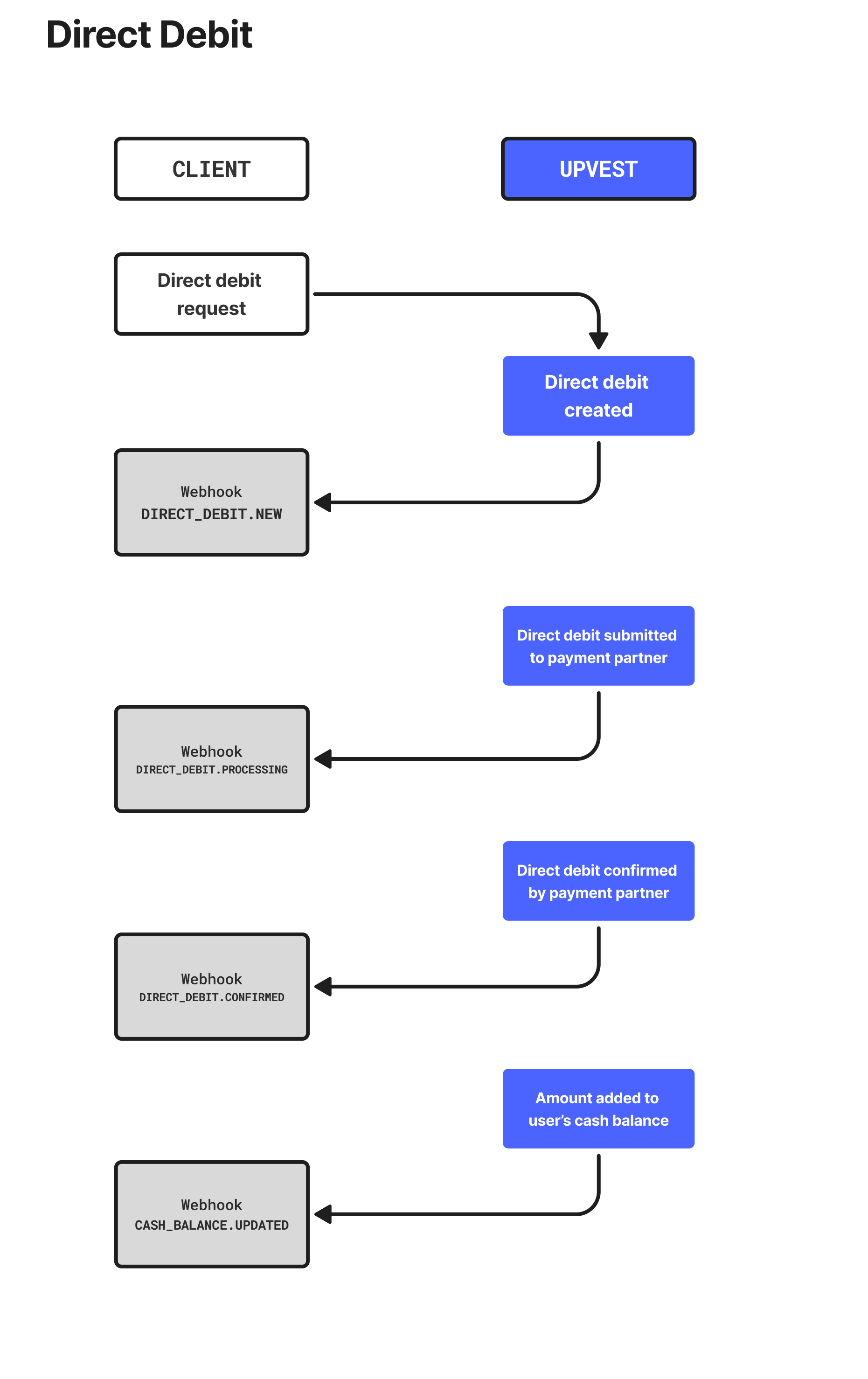
To request a direct debit funding, specify the mandate and funding amount for the end user's or business entity's account group and call
{
    "user_id": "83d83ec2-d2ca-49ff-bbea-b92b5c3be202",
    "account_group_id": "1ea60f56-b67b-61fc-829a-0242ac130003",
    "mandate_id": "95b8304e-19fc-4cd9-8e50-82532e6b8d8c",
    "cash_amount": "200.00",
    "currency": "EUR",
    "remittance_information": "payment for green energy portfolio",
    "purpose_code": "OTHR"
}
The user_id field is optional and in the process of being removed from the request. You should not include the user_id in the request.
Remittance Information Disclaimer
Please be aware that while our API allows you to specify detailed remittance information for your direct debits, we cannot guarantee that this information will be transmitted to the recipient's bank without modification.
Some banks may have limitations on the characters or length of remittance information they can process. This may result in the information being truncated, altered, or omitted entirely.
We recommend keeping your remittance information concise and avoiding special characters or non-standard formatting.
You will also receive a direct debit NEW webhook with exactly the same payload.
Webhooks notify you of events in business processes, not the success or failure of the initialisation of those processes.
Please be sure to check the HTTP status of the response to your requests and handle failure cases appropriately.
Recommended: Use webhooks to track direct debit status
To track the direct debit statuses, set up a webhook listener for DIRECT_DEBIT.PROCESSING and DIRECT_DEBIT.CONFIRMED events. You will receive automatic notifications as the direct debit progresses through processing and settlement (typically 2–5 business days via SEPA).
For more information, refer to Payment webhook events
Once all relevant payment checks have been passed and the payment instruction has been forwarded to our payment partner, the direct debit transitions into the PROCESSING status and you will receive a direct debit event via webhook.
Afterwards, the direct debit gets executed and confirmed at our payment partner and you will receive a direct debit CONFIRMED webhook.
Now that the account group is sufficiently funded, you are ready to proceed with your first order request. Alternatively, you can also register a reference bank account if you would like to withdraw funds instead.