

- Authentication scopes —
accounts:admin,businesses:admin,checks:admin,roles:admin,users:admin,taxes:admin
For more information, refer to Authentication scopes.
This section explains how to create a business account for sole traders. For information on business accounts for larger businesses and corporations, refer to the Create a corporate business account section.
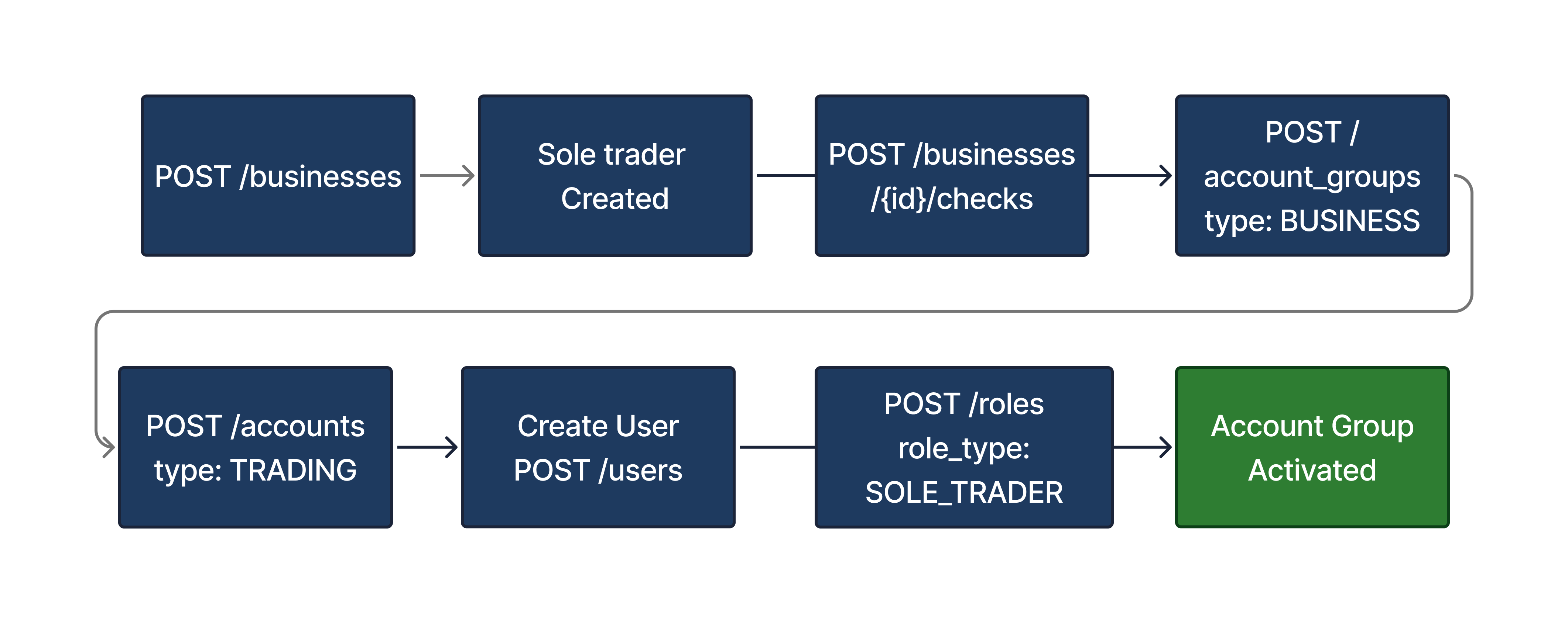
Clients must use the /businesses endpoint to create a new sole trader entity in addition to the user entity. This additionally includes all tax and identity information related to the individual’s incorporation.
POST /businesses
{
    "contact_email": "acme.corporation@example.com",
    "registered_address": {
        "address_line1": "110",
        "address_line2": "Schonhauser Allee",
        "postcode": "101110",
        "city": "Berlin",
        "state": "BE",
        "country": "DE"
    },
    "registration_number": "111221111",
    "tax_information": {
        "tax_country_code": "DE",
        "tax_identification_type": "STEUERNUMMER",
        "tax_identification_number": "12345678901",
        "is_resident_in_multiple_tax_jurisdictions": false,
        "is_subject_to_fatca": false
    },
    "business_type": "SOLE_TRADER",
    "identification": {
        "company_name": "Max Mustermann - Web Design",
        "incorporation_date": "2000-10-10",
        "legal_designation": "EINZELUNTERNEHMER"
    },
    "terms_and_conditions": {
        "consent_document_id": "6a163d14-5b3d-48be-ac90-43314e96be71",
        "confirmed_at": "2024-10-24T14:14:22Z"
    },
    "data_privacy_and_sharing_agreement": {
        "consent_document_id": "fa2227c3-2b29-47e1-84da-996d09517edc",
        "confirmed_at": "2024-10-24T14:16:22Z"
    }
}
The table below shows the related parameters and their descriptions.
| Parameter | Required | Description |
|---|---|---|
contact_email | Required | Contact email address of the sole trader. |
registered_address | Required | The official, registered address of the sole trader. |
registration_number | Required | The registration number of the sole trader as listed in the commercial registry. |
tax_information.tax_country_code | Required | Accepted country code as listed in ISO 3166-1 alpha-2 code. For Germany, this value equals "DE". |
tax_information.tax_identification_number | Required | Tax identification number of the business. For Germany, this equals the USt-ID / Umsatzsteuer-ID. |
tax_information.is_resident_in_multiple_tax_jurisdictions | Required | Indicates if the sole trader is resident in multiple tax jurisdictions. At this time, business accounts are only available for entities resident in a single tax jurisdiction. |
tax_information.is_subject_to_fatca | Required | Indicates if the sole trader is subject to FATCA regulations. At this time, business accounts are only available for entities that are not subject to FATCA regulations. |
business_type | Required | The official, registered type of business. Currently we support the following: - SOLE_TRADER: In Germany, this applies to Einzelunternehmen. - LIMITED_LIABILITY_COMPANY: In Germany, this applies to the following: Gesellschaft mit beschränkter Haftung (GmbH) Unternehmergesellschaft (UG). Aktiengesellschaft (AG). For instructions to onboard corporate corporate entities, refer to the Creating corporate business accounts section. |
identification.company_name | Required | The name of the sole trader entity. |
identification.incorporation_date | Optional | Incorporation date of the business in YYYY-MM-DD format. RFC 3339, section 5.6 |
identification.legal_designation | Required | The country-specific legal designation of the sole trader business. In Germany, the legal_designation supports the following values:- EINZELUNTERNEHMER: A sole trader that functions as a commercial sole proprietor (e.g., retailers, craftsmen). - FREIBERUFLER: A sole trader that operates as a liberal professional/freelancer (e.g., doctors, lawyers, artists) . - EINGETRAGENER_KAUFMANN: A sole trader that operates as a registered merchant (e.Kfm.). - EINGETRAGENE_KAUFFRAU: A sole trader that operates as a registered merchant (e.Kfr.). |
data_privacy_and_sharing_agreement.consent_document_id | Required | The universally unique identifier (UUID) of the data privacy and sharing agreement document. |
data_privacy_and_sharing_agreement.confirmed_at | Required | The timestamp when the data privacy and sharing agreement was confirmed. |
terms_and_conditions.consent_document_id | Required | The universally unique identifier (UUID) of the consent document. |
terms_and_conditions.confirmed_at | Required | Timestamp when the terms and conditions were confirmed. |
The process for creating a business entity for a sole trader and its lifecycle goes through the following statuses.
| Status | Description |
|---|---|
| INACTIVE | The sole trader’s approval is pending. The sole trader entity is visible via our API but cannot be processed. |
| ACTIVE | The sole trader is active. Their account groups can be funded and can accept orders once the required roles are active and the business checks have passed. For more information, refer to Role-based activation. |
| OFFBOARDING | The offboarding process has started. The sole trader remains in this status until there are no open account groups and no pending regulatory reporting (e.g., annual tax statements). |
| OFFBOARDED | The sole trader is offboarded. The sole trader’s record can be kept for the regulatory period. |
You can listen to the Business events webhook for the BUSINESS.CREATED message which provides confirmation that the business was successfully created.
{
  "id": "2df83681-6a42-4837-a554-a8197335bcfa",
  "created_at": "2021-11-22T09:04:42Z",
  "type": "BUSINESS.CREATED",
  "object": {
    "id": "a9a72268-4f3c-4de2-abb9-a553a3bb7608",
    "created_at": "2024-10-24T14:14:22Z",
    "updated_at": "2024-10-24T14:14:22Z",
    "contact_email": "acme.corporation@example.com",
    "registered_address": {
        "address_line1": "110",
        "address_line2": "Schonhauser Allee",
        "postcode": "101110",
        "city": "Berlin",
        "state": "BE",
        "country": "DE"
    },
    "registration_number": "111221111",
    "tax_information": {
        "tax_country_code": "DE",
        "tax_identification_type": "STEUERNUMMER",
        "tax_identification_number": "12345678901",
        "is_resident_in_multiple_tax_jurisdictions": false,
        "is_subject_to_fatca": false
    },
    "business_type": "SOLE_TRADER",
    "identification": {
        "company_name": "Max Mustermann - Web Design",
        "incorporation_date": "2000-10-10",
        "legal_designation": "EINZELUNTERNEHMER"
    },
    "terms_and_conditions": {
        "consent_document_id": "6a163d14-5b3d-48be-ac90-43314e96be71",
        "confirmed_at": "2024-10-24T14:14:22Z"
    },
    "data_privacy_and_sharing_agreement": {
        "consent_document_id": "fa2227c3-2b29-47e1-84da-996d09517edc",
        "confirmed_at": "2024-10-24T14:16:22Z"
    },
    "status": "ACTIVE"
},
  "webhook_id": "1b097e06-8a14-4181-b72a-de0972a3c57b"
}The self-assessment check provides you with the details needed to perform a risk assessment for the sole trader. This includes listing the sole trader’s industry, the countries in which they operate, and financial information like revenue and asset values.
For Bring your own license - Single accounts (BYOL-SA) clients, the self-assessment is only required if you also leverage Upvest for tax onboarding.
POST /businesses/{business_id}/checks
{
    "type": "BUSINESS_SELF_ASSESSMENT",
    "check_confirmed_at": "2021-08-24T14:15:22Z",
    "business_industry": "MANUFACTURING",
    "purpose_of_business_relationship": "WEALTH_GROWTH",
    "primary_countries_of_activity": [
        "DE",
        "FR"
    ],
    "annual_revenue": {
        "currency": "EUR",
        "lower_bound": 0,
        "upper_bound": 50000
    },
    "expected_volume_of_investment": {
        "currency": "EUR",
        "lower_bound": 0,
        "upper_bound": 50000
    },
    "total_asset_value": {
        "currency": "EUR",
        "lower_bound": 0,
        "upper_bound": 50000
    }
}| Parameter | Required | Description |
|---|---|---|
business_id | Required | The unique identifier for the sole trader. |
type | Required | For the self assessment check, set this equal to BUSINESS_SELF_ASSESSMENT. |
check_confirmed_at | Required | The date and time when the check was confirmed. |
business_industry | Required | The industry classification for the sole trader. This value is key for AML checks and includes a subset of NACE codes (Nomenclature statistique des activités économiques dans la Communauté Européenne) as set by the European Commission. For a list of all available enums and their related NACE codes, refer to List of business industries and NACE Codes. |
purpose_of_business_relationship | Required | Lists the purpose of the business relationship with regards to trading. This field accepts the following values: - WEALTH_GROWTH- TREASURY_LIQUIDITY_MANAGEMENT- HEDGING_RISK_MANAGEMENT- EMPLOYEE_BENEFIT_FUNDING- STRATEGIC_INVESTMENT |
primary_countries_of_activity | Required | List of all the primary countries where the sole trader operates. This field accepts ISO 3166-1 alpha-2 country codes. |
annual_revenue.currency.lower_bound.upper_bound | Required | The range of annual revenue for the sole trader. To report the annual revenue, use the following: - .currency: the currency used for the values below. Set this equal to either EUR or GBP.- .lower_bound: the lowest estimated annual revenue.- .upper_bound: the highest estimated annual revenue.Note: Both .currency and .lower_bound are required. The .upper_bound value is optional. |
expected_volume_of_investment.currency.lower_bound.upper_bound | Required | The range of expected investment volume. To report the expected volume, use the following: - .currency: the currency used for the values below. Set this equal to either EUR or GBP.- .lower_bound: the lowest estimated investment volume.- .upper_bound: the highest estimated investment volume.Note: Both .currency and .lower_bound are required. The .upper_bound value is optional. |
total_asset_value.currency.lower_bound.upper_bound | Required | The range of total asset value for the business. To report the total asset value, use the following: - .currency: the currency used for the values below. Set this equal to either EUR or GBP.- .lower_bound: the lowest estimated asset value.- .upper_bound: the highest estimated asset value.Note: Both .currency and .lower_bound are required. The .upper_bound value is optional. |
You can listen to the Business checks event webhook for the BUSINESS_CHECK.PASSED message which provides confirmation that the business has passed the required check.
{
  "id": "38fc59d0-fc42-46ef-9512-824773219b2e",
  "created_at": "2021-11-19T13:06:57.820371265Z",
  "type": "BUSINESS_CHECK.PASSED",
  "object": {
    "id": "a9a72268-4f3c-4de2-abb9-a553a3bb7608",
    "business_id": "1b097e06-8a14-4181-b72a-de0972a3c57b",
    "type": "KYB",
    "originally_confirmed_at":  "2020-08-24T14:15:22Z",
    "check_confirmed_at": "2020-08-24T14:15:22Z",
    "data_download_link": "https://bucket.customer.com/por/kyb.zip",
    "document_type": "KYB_DOCUMENTS",
    "status": "PASSED"
  },
  "webhook_id": "1b097e06-8a14-4181-b72a-de0972a3c57b"
}To create the business account group, set type: "BUSINESS" when creating the account group.
POST /account_groups
{
  "business_id": "bc6f8c82-1234-4b56-a7d8-9e012345f678",
  "type": "BUSINESS",
  "securities_account_number": "12345689"
}
Once completed, you can create a new account for the sole trader using the /accounts endpoint.
{
  "business_id": "bc6f8c82-1234-4b56-a7d8-9e012345f678",
  "account_group_id": "fa2414ed-8d62-46fd-85ed-565a340c81d6",
  "type": "TRADING",
  "name": "Main account"
}Creating related users for business accounts has a slightly different process compared to creating an individual user. For business accounts, the users are not responsible for the following items and can continue to be onboarded without submitting the following:
- Accepting terms and conditions
- Data privacy and sharing agreement
Instead, these occur as part of creating the business entity.
Users that are also opening personal investing accounts must accept both agreements.
For more information on creating a user, refer to our Users guide.
POST /users
{
  "first_name": "Karl",
  "last_name": "Schmidt",
  "email": "karl.schmidt@example.com",
  "salutation": "SALUTATION_MALE",
  "title": "DR",
  "birth_date": "1972-09-30",
  "birth_city": "Berlin",
  "birth_country": "DE",
  "birth_name": "Schmidt",
  "nationalities": [
    "DE",
    "AU"
  ],
  "phone_number": "4930901820",
  "postal_address": {
    "address_line1": "Rosenweg 221",
    "address_line2": "apt. 33",
    "postcode": "45678",
    "city": "Berlin",
    "state": "BE",
    "country": "DE"
  },
  "address": {
    "address_line1": "Rosenweg 221",
    "address_line2": "apt. 33",
    "postcode": "45678",
    "city": "Berlin",
    "state": "BE",
    "country": "DE"
  },
  "fatca": {
    "status": false,
    "confirmed_at": "2020-08-24T14:15:22Z"
  }
}The user that is part of a business must be assigned a specific role using the /roles API. For sole traders, the user must complete a Know Your Customer (KYC) check.
In addition, all users for a business account are subject to the Politically Exposed Persons (PEP) checks and sanctions screening.
For more information on creating a user, refer to our Users guide.
POST /users/{user_id}/checks
{
  "type": "KYC",
  "check_confirmed_at": "2019-08-24T14:15:22Z",
  "data_download_link": "https://bucket.customer.com/ident/user3.zip",
  "document_type": "ID_CARD",
  "document_expiration_date": "2030-01-01",
  "nationality": "DE",
  "provider": "KYC provider",
  "method": "VIDEO_ID",
  "confirmed_address": {
    "address_line1": "Rosenweg 221",
    "address_line2": "apt. 33",
    "postcode": "45678",
    "city": "Berlin",
    "state": "BE",
    "country": "DE"
  }
}Upvest requires the user to submit tax-related information as part of their onboarding process.
{
   "tax_residencies": [
      {
         "country": "DE",
         "tax_identifier_number": "12345678901"
      }
   ]
}If required, you must create a user identifier for the end user. Complete details on user identifiers can be found in our User Identifiers section.
{
    "type": "NATIONAL_ID",
    "issuing_country": "PL",
    "identifier_standard": "PESEL",
    "identifier": "83053078917"
}For sole traders, you must use the /roles endpoint to set the user as SOLE_TRADER.
POST /roles
{
  "entity_id": "0d10c51f-33f2-4399-b8ab-92ec84e6b2f0",
  "entity_type": "BUSINESS",
  "role_type": "SOLE_TRADER",
  "user_id": "9c36af78-91a0-4174-a515-fc81214e3dab"
}We provide the /businesses/{business_id}/data_change_requests endpoint to allow you to update the contact email for any sole trader.
POST /businesses/{business_id}/data_change_requests
{
    "contact_email": "acme.corporation@example.com"
}