

This guide walks you through the process of creating a German pension offering including onboarding users, creating account groups and accounts, creating the tax wrapper, and setting up the allowance.
- Authentication scopes -
pensions:admin - Webhook handler ready — Set up a webhook endpoint to listen for events relating to pension account opening
- Subscribe to
USERS.*events. - Subscribe to
ACCOUNT_GROUP.*events. - Subscribe to
PENSION_DE_WRAPPER.*events. - Subscribe to
ACCOUNT.*events. - Subscribe to
PENSION_DE_WRAPPER_ALLOWANCE.*events.
- Subscribe to
For more information, refer to Implementing webhooks.
Before opening an Altersvorsorgedepot and/or Standarddepot, an end user must be created in the Upvest system. For existing eligible end users, Altersvorsorgedepot and/or Standarddepot accounts can be opened directly after adding additional data to the user model as outlined below.
Adding a user follows the usual user creation flow (see the Users guide for more information). This includes verifying that the user is a tax resident of Germany. You can use the POST /users/{user_id}/tax_residencies endpoint to create the end user’s residency.
In addition, there are a series of fields that are required for both the Altersvorsorgedepot and the Standarddepot when applying for the government bonus. You can add the additional fields when completing the initial user onboarding or when updating existing users details.
If an end user provides these details after onboarding, or for other changes to user data, you can update the details for an existing user by submitting a user data change via the POST /users/{user_id}/data_change_requests endpoint as shown below.
When requesting user data changes, submit each request individually and wait for the /user events webhook confirmation before submitting the next request.
POST /users/{user_id}/data_change_requests
{
"gender": "MALE"
}
The birth_name field is required when the last_name is different.
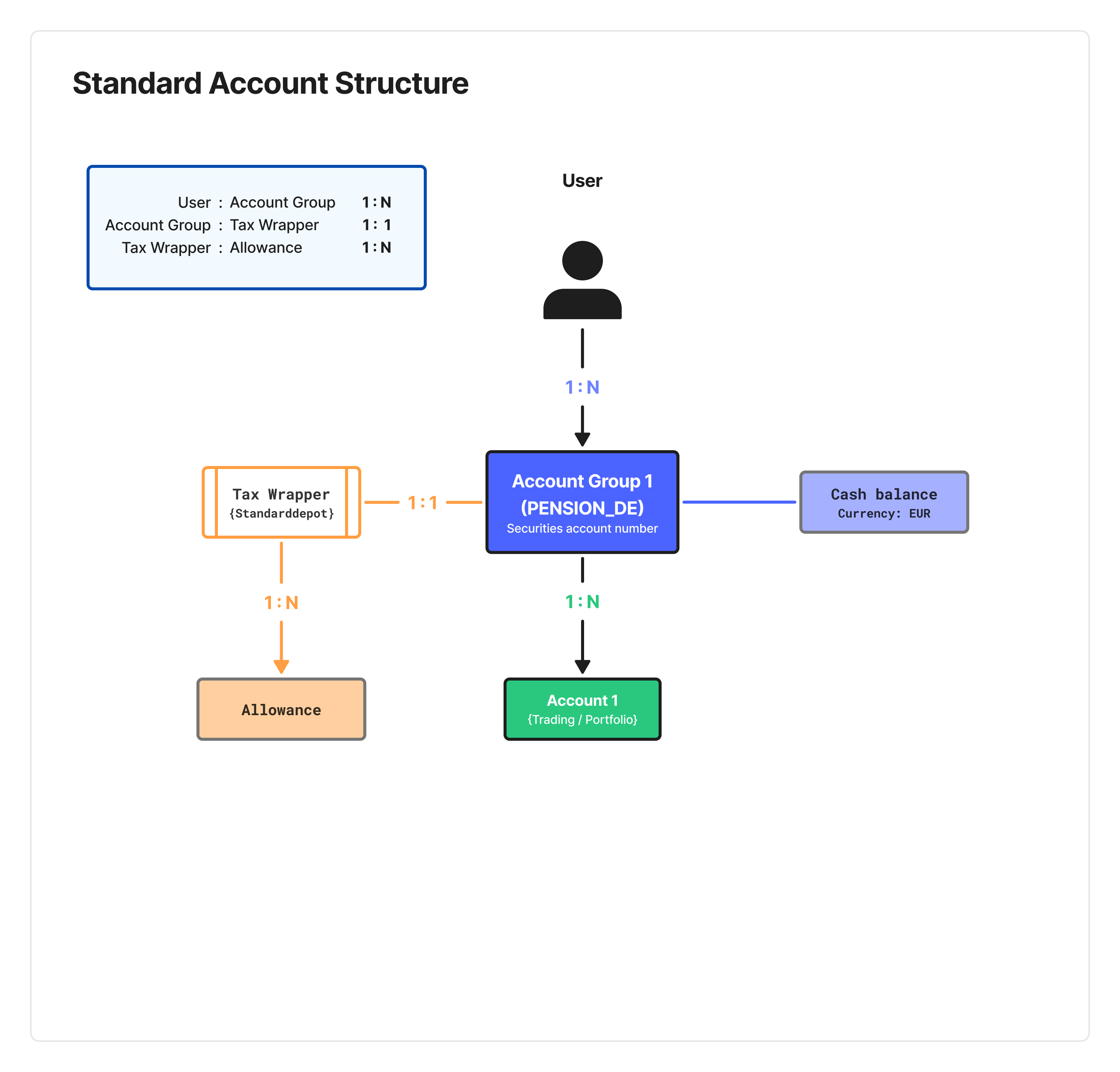
After creating or updating the user, the next step is the creation of an account group. You must create a separate account group for each contract. The account group for Altersvorsorgedepot and Standarddepot is PENSION_DE in both cases.
Set type equal to PENSION_DE when creating the account group:
POST /account_groups
{
  "user_id": "413715f2-5401-4b97-8055-034a6b879f8c",
  "type": "PENSION_DE"
}
After creating the account group, you can proceed with creating the tax wrapper and accounts.
Maximum two pension account rule
End users can hold a maximum of two pension accounts at any time. Creating a third pension account will be restricted.
The business rules and logic applicable to a tax-wrapped investment product are managed through the tax wrapper entity. The tax wrapper represents the entirety of the Altersvorsorgedepot or Standarddepot contract.
When creating the tax wrapper the type - either Altersvorsorgedepot (AVD) or STANDARDDEPOT - must be specified for each pension account. A dedicated API call is available for each tax wrapper type.
The contract number is required to enable Upvest to register the account with the ZfA, process bonus applications and transfers. Clients can either provide their own contract number or Upvest can generate the contract number. Contract numbers must be unique, any repeated contract numbers will be rejected. When tenant configuration is set for Upvest to create the numbers, they are automatically provided in the tax wrapper creation response.
The expected payout age informs the payout start date on the payout configuration, which is automatically created on tax wrapper creation. Any further changes to payout start date can be done directly in the payout configuration.
You can update the fields related to the payout phase as described in the Payout phase section of this guide.
The end user must accept the terms and conditions. This requires setting the confirmed_at timestamp for the terms and conditions. This value can be set by:
- The client provides the
confirmed_attimestamp in thePOSTrequest when creating the tax wrapper. - The client adds the
confirmed_attimestamp in aPATCHrequest anytime before the tax wrapper is activated. - Upvest automatically adds the
confirmed_attimestamp and sets it equal to when the tax wrapper is activated.
Once confirmed and the tax wrapper is active, we send the details of the contract to the ZfA and the confirmed_at timestamp can no longer be updated.
The confirmed_at date informs the contract start date registered with the ZfA and is used to determine eligibility if more than two contracts are registered to a user.
POST /pension_de/wrappers
{
  "type": "AVD",
  "account_group_id": "0d68fea2-66e8-4ea8-b507-276e7a1eb4aa",
  "expected_payout_age": 67,
  "terms_and_conditions": {
    "confirmed_at": ""
  },
  "contract_number": "XJ49-BN22-9901-PQ88",
  "product_information_sheet_id": "a3f9c1d7-82b4-4e6f-9d23-5c0e7f8a1b2d"
}
When configuring the tax wrapper, you can set type to either AVD or STANDARDDEPOT depending on the use case.
PATCH /pension_de/wrappers/{tax_wrapper_id}
{
  "terms_and_conditions": {
    "confirmed_at": "2027-07-21T14:10:00.00Z"
  },
  "expected_payout_age": 67,
  "product_information_sheet_id": "f7d2e0a9-3c61-4b8e-a0f5-9d4c8e2b7a16"
}| Field | Description |
|---|---|
type | The type of pension account. This field accepts AVD or STANDARDDEPOT. |
account_group_id | The UUID generated when creating the account group. |
expected_payout_age | The age at which the end user would like to move to the payout phase. Clients can choose to default to an age set out in the contract or allow the end user to select. For new users, this value must be between 65-70. This value cannot be updated once the tax wrapper is created. Instead, you can update the payout date in the payout configuration as described in the Payout phase section of this guide. |
contract_number | The specific identifier for the Altersvorsorgedepot or Standarddepot. For details on correctly setting this value, refer to the Contract number section above. |
terms_and_conditions.consent_document_id .confirmed_at | The unique identifier to record the acceptance of the terms and conditions and the timestamp for acceptance. For details on correctly setting this value, refer to the Terms and conditions section above. |
tax_wrapper_id | The unique identifier for the tax wrapper. |
product_information_sheet_id | Set this value equal to the ID of the product information sheet (Produktinformationsblatt) associated with this tax wrapper. |
After a tax wrapper is created, it remains inactive until all activation requirements are fulfilled:
- The user must have a valid Tax Identification Number (TIN) and complete a tax residency assessment.
- The user must review and confirm all pre-contractual disclosures, including the product information sheet, and formally accept the pension contract.
The tax wrapper status changes to ACTIVE once these conditions are satisfied. Following tax wrapper activation, the account group and accounts are automatically activated and ready to receive contributions.
Create an account as described in the Create Accounts guide.
POST /accounts
{
  "user_id": "413715f2-5401-4b97-8055-034a6b879f8c",
  "account_group_id": "0d68fea2-66e8-4ea8-b507-276e7a1eb4aa",
  "type": "PORTFOLIO",
  "name": "Main account"
}
When creating the account, you can set type to either TRADING or PORTFOLIO depending on the use case:
Either account type (PORTFOLIO or TRADING) can be used to support both Standarddepot and Altersvorsorgedepot. For the Standarddepot, it is recommended to use portfolio accounts to simplify the rebalancing requirements when approaching the payout age.
By using a portfolio account you can additionally benefit from the following Upvest functionality:
- Creating propositions with portfolio allocations for Standarddepot and discretionarily managed Altersvorsorgedepot.
- Allowing the end user to create their customised portfolio allocation in Standarddepot and self-directed Altersvorsorgedepot.
- Automate order weighting with portfolio orders.
- Utilise self-balancing orders to minimise portfolio drift and reduce the need for rebalancings.
- Allowing users to rebalance their accounts.
With the Standarddepot, leveraging portfolios provides the following benefits when approaching the payout phase:
- Switching the portfolio allocation to the prescribed weighting.
- Setting the new allocation in advance of the mandated rebalance period without triggering an immediate rebalance, enabling a glide path to reduce the impact of a single rebalancing event.
- Utilising self-balancing orders so new contributions work towards the (new) target allocation.
- Completing the mandated rebalance at both 5 years, and 2 years, prior to the payout phase if not achieved already with the glide path.
Once the tax wrapper has been successfully created and activated, the Investment API will automatically create the underlying Allowance resource for the current tax year and confirm its creation via the PENSION_DE_WRAPPER and PENSION_DE_WRAPPER_ALLOWANCE webhooks.
The allowance entity tracks all user contributions to help track the minimum amount for the bonus application and prevents contributions exceeding the maximum contribution amount allowed per tax year. Once the contribution amount reaches the limit, additional contributions are automatically rejected. See the Blocking contributions beyond the allowance section for details.
Since users are not allowed to carry over remaining allowance amounts from prior years, the Investment API automatically closes the completed year and creates a new allowance each year.
You can view a user’s allowance using the GET /pension_de/wrappers/{tax_wrapper_id}/allowances/ endpoint. This provides access to the amount of allowance available to the user.
GET /pension_de/wrappers/{tax_wrapper_id}/allowances/
{
 "meta": {
   "offset": 0,
   "limit": 100,
   "count": 2,
   "total_count": 2,
   "sort": "valid_from",
   "order": "DESC"
 },
 "data": [
   {
     "allowance_id": "019999a3-8a17-74e6-bfbd-50d9c7705ea0",
     "tax_wrapper_id": "019999a3-c02a-7043-b100-9c2d76564748",
     "tax_year": "2028",
     "type": "ANNUAL",
     "status": "ACTIVE",
     "currency": "EUR",
     "total_amount": "6840.00",
     "used_amount": "0.00",
     "remaining_amount": "6840.00",
     "created_at": "2027-07-21T14:10:00.00Z",
     "updated_at": "2027-07-21T14:10:00.00Z",
     "valid_from": "2028-01-21T14:10:00.00Z",
     "valid_to": "2028-12-31T23:59:59.00Z"
   },
   {
     "allowance_id": "019999a3-8a17-74e6-bfbd-50d9c7705ea0",
     "tax_wrapper_id": "019999a3-c02a-7043-b100-9c2d76564748",
     "tax_year": "2027",
     "type": "ANNUAL",
     "status": "EXPIRED",
     "currency": "EUR",
     "used_amount": "0.00",
     "remaining_amount": "6840.00",
     "created_at": "2027-07-21T14:10:00.00Z",
     "updated_at": "2027-07-21T14:10:00.00Z",
     "valid_from": "2027-07-21T14:10:00.00Z",
     "valid_to": "2027-12-31T23:59:59.00Z"
   }
 ]
}| Field | Description |
|---|---|
allowance_id | The UUID that is created for each annual allowance. |
tax_year | The year of the allowance. |
type | The ANNUAL type refers to how the regulatory contribution limit renews annually. Regulatory changes to this limit are managed by Upvest and will automatically be applied before the start of the tax year. |
status | This field may contain the following values: - ACTIVE: the allowance is fully enabled and the user can make additional contributions up to the value of the remaining_amount. - EXPIRED: the allowance is outside of the valid_from and valid_to dates. The end user can no longer make contributions against this allowance. Once an allowance entity with the type ANNUAL hits the valid_to date, it will transition to the status EXPIRED. Expired allowances do not roll over. New allowance entities will be created at commencement of the new tax year. |
| Allowance values | |
used_amount | The amount of contributions submitted so far. |
remaining_amount | The calculated difference between the annual allowance and the used_amount, indicating how much remaining allowance is available. |
valid_from and valid_to | Shows the period in which the allowance is in effect. Normally, these values equal the first and last date of the year. |
Each end user is allowed to pay-in a maximum of €6,840 per account. The allowance entity tracks the used amount for each contract and automatically rejects contributions that would take the account beyond the allowable maximum amount. The allowance entity rejects the full contribution amount if the contribution would cause the allowance to exceed the maximum amount.
For example: if an end user submits a contribution of €100 when the remaining_amount equals €80, the whole €100 contribution will be rejected. In this case the client can retry with the correct contribution amount of €80.
This works differently depending on whether your cash configuration setup is either post-trade settlement or pre-funding.
In this setup, the client retains control of cash payments into their pension pooling account. It is important to proactively check there is sufficient remaining_amount before accepting a payment via the PENSION_DE_WRAPPER_ALLOWANCE webhook or the GET /pension_de/wrappers/{tax_wrapper_id}/allowances/ endpoint.
As a fail safe, Upvest also checks all virtual cash increases against the remaining_amount. If a contribution results in an ineligible contribution, Upvest rejects the virtual cash increase. This blocks the order from being processed and the client will be notified why the contribution was rejected.
To rectify, the client can reduce the virtual cash payment and return the payment to the end user. The allowance automatically updates.
In this setup Upvest is able to check the payment instruction directly against the allowance. Based on the remaining_amount Upvest either:
- accepts the contribution and updates the allowance or,
- rejects the payment; in case of SEPA Credit Funding, the payment is returned to the end user, while SEPA Direct Debit are cancelled before settlement.
The PENSION_DE_WRAPPER_ALLOWANCE webhook confirms the action and includes the rejection reason.
Once the payment has been accepted the order can then be placed. For savings plans, this occurs automatically.