

This guide walks through the process of requesting a transfer of a pension account from another provider. It explains how Upvest manages this with the ZfA and the ceding provider and how you can keep track of the transfer throughout its lifecycle.
End users may transfer their pension accounts into a new or another existing pension account. Specifically this includes:
- Transferring an existing Altersvorsorgedepot/Standarddepot account from another provider into a new or existing pension account.
- Transferring an existing Riester plan from another provider into a new or existing pension account.
- Supporting internal transfers at the same provider
- Tracking the progress of a transfer out to a new provider (transfers out are initiated by the user requesting a transfer in with a new provider)
The /pension_de/transfers endpoint provides the ability to initiate the transfer.
Once an end user has initiated a transfer, Upvest manages communication with the Zentrale Zulagenstelle für Altersvermögen (ZfA) and the ceding provider. The process involves:
- Confirming the pension details with the ceding provider
- Agreeing a date the transfer can be started and completed
- Sharing bank details, tax pot history and contribution history
- Receiving/sending the cash from/to the other provider
- Account closure of the old account (ceding provider responsibility)
- Reporting opening of the new account to the ZfA (where transfer constitutes a new account opening)
- Webhook handler ready — Set up a webhook endpoint to listen for updates relating to transfers
- Subscribe to
PENSION_DE_TRANSFER.*events. - Subscribe to
PENSION_DE_TRANSFER_CONFIRMATION_CASH.*events. (post trade only)
- Subscribe to
- For more information, refer to Implementing webhooks.
Clients can monitor the transfer progress using the German pension transfer events webhooks. Transfers can take several weeks or months to complete so it is important to consider in the UX how to manage the end-user's expectations and keep them updated with the transfer.
All transfers are received as a cash transfer from the ceding provider. Transfers are always for the entire pension account and result in the originating account being closed. Partial transfers are not allowed. Funding the pension from a transfer does not impact the end user's contribution limits.
For incoming transfers the end user can continue to contribute to their pension as normal. When transferring out, Upvest will no longer accept contributions once the outgoing transfer has progressed to the status PROCESSING.
To ensure both the allowances and the tax pot history are correct, cash from transfers is treated differently from contributions. The exact process depends on your payment and settlement flow.
Upvest handles the transfer process. However, for post-trade clients, cash always arrives at the client’s pension pooling account. Once the cash is received, you must confirm the receipt with Upvest.
Upvest then confirms that the received amount matches the tax pot history that was sent by the ceding provider.
Once reconciled, Upvest updates the cash balance on the pension account and the funds are available for investing. Clients can also opt for Upvest to auto-invest the transferred cash in an existing investment strategy.
For pre-funding clients, Upvest operates the pension pooling account and has visibility of the cash sent by the ceding provider. Pre-funding clients do not need to utilise the transfer confirmation process.
Upvest reconciles the received amount with the tax pot history sent by the ceding provider.
Once reconciled, Upvest updates the cash balance and the funds are available for investing. Clients can also opt for Upvest to auto-invest the transferred cash in an existing investment strategy.
The following account transfers are not accepted and should be made clear to the end user before completing the transfer in request:
- Pension accounts with a home subsidy account (Wohnförderkonto).
- Pension accounts with a pension equalisation as a consequence of divorce (Versorgungsausgleich).
- Company/occupational pension accounts (betriebliche Altersvorsorge).
- Pension accounts that have already received a transfer due to death (Übertragung aufgrund eines Todesfalles).
- Pension accounts with no balance (Nullvertrag).
- Pensions already in the payout phase
End users can hold a maximum of two pension accounts at any time (if concluded after 31.12.2026). With transfers an exception is made to facilitate moving providers.
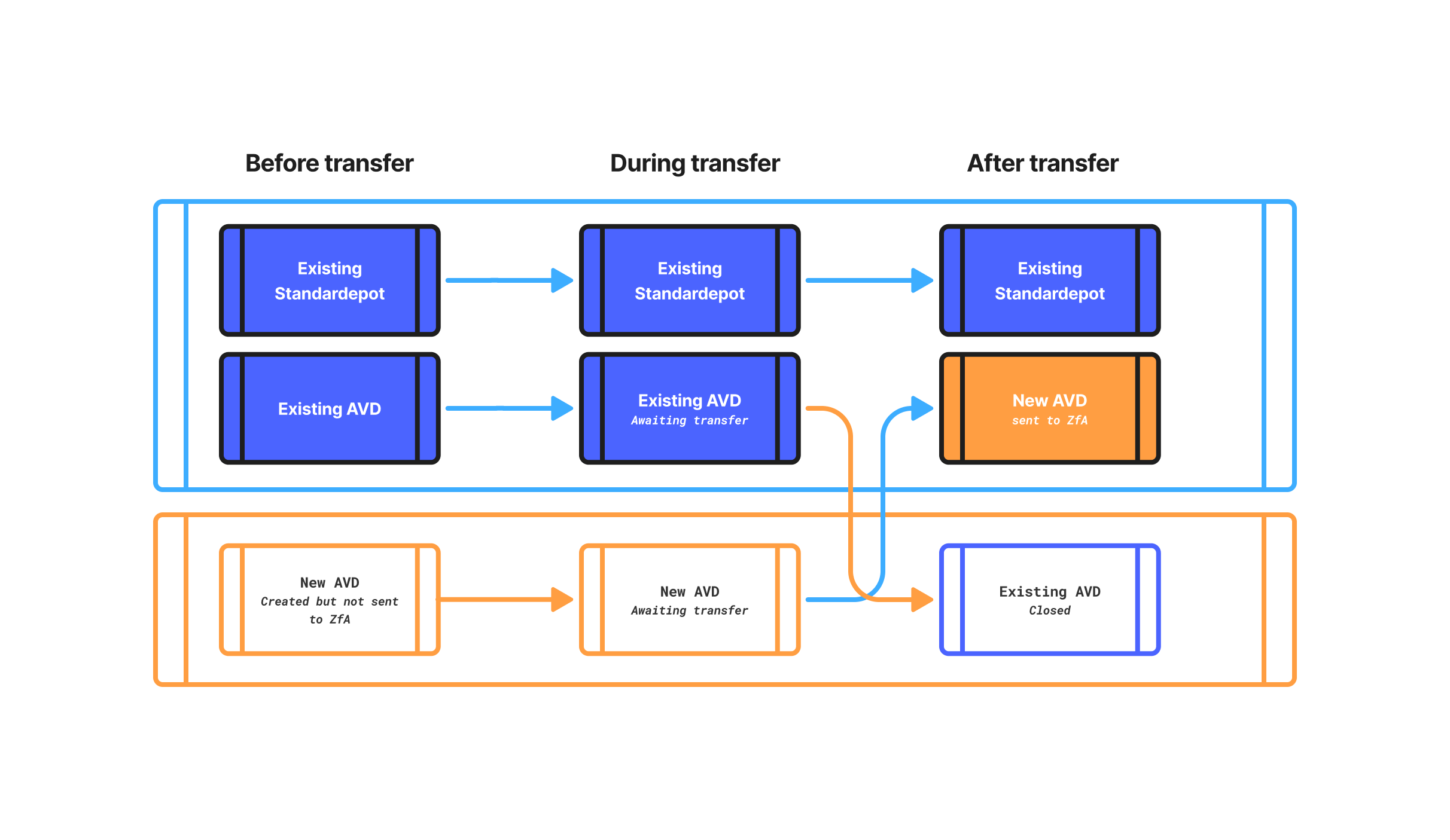
When a transfer is instructed during account opening Upvest waits for the transfer to complete before notifying the ZfA of the new account.
This allows the new account to replace the old account in the two account limit. Please ensure your onboarding flow does not allow more than two accounts and transfer flows are included as part of the account opening process.
At onboarding, the transfer amount can also be included in the product information sheet to increase the accuracy of the projected retirement balance.
This type of transfer results in the termination of the existing Riester contract, liquidation of its capital, and completing a cash transfer into the new Altersvorsorgedepot.
When transferring an existing Riester plan to an Altersvorsorgedepot, the end user must explicitly accept the loss of grandfathering rights, including the contribution guarantee or insurance coverages.
Similar to a Riester transfer, transferring an Altersvorsorgedepot results in the liquidation of the existing capital and completing a cash transfer into the new Altersvorsorgedepot following confirmation from the ZfA. End users wishing to transfer out should be directed to their new pension provider.
Once the transfer is completed, the bonus and contribution history is updated, allowing for accurate accounting of the tax pot history.
Transfers between pension accounts (such as Standarddepot >> Altersvorsorgedepot or Riester >> Altersvorsorgedepot) are initiated in the same way as transfers coming from other providers.
The process is still handled via the ZfA process with Upvest sending the data required from new and ceding provider. The assets are liquidated and moved as a cash transfer into the new Altersvorsorgedepot, together with the existing tax history.
A capital transfer to a pension account with the same provider must be carried out free of charge.
Initiation
This begins the process with the end user requesting a transfer-in to their pension account. Clients provide the information about the ceding provider, the current contract number, and the certification number to Upvest.
Discovery
During this phase Upvest is communicating with the ZfA and the ceding provider to confirm the transfer details and agree on a date to process the transfer. During this phase the transfer is updated with a ZfA reference number, earliest possible date for the transfer, bank details and the final agreed transfer date from the ceding provider (maximum nine months in the future).
Processing
At this point the ceding provider prepares the tax pot history and liquidates assets. At this point both accounts are blocked at the ZfA and no ZfA processes can be initiated or processed. End-users may still contribute to their target account. Once this is completed Upvest receives the tax pot history of the account and the cash to the pension pooling account. Upvest will complete a final reconciliation before making the money available for investing.
Settled
Settled status confirms that all checks have been completed on the transferred cash and tax history and the transferred cash can now be invested. In the case where the transfer was part of account opening, Upvest will now notify the ZfA of the new contract.
A transfer can be cancelled by the client on behalf of the end user while it is in NEW or DISCOVERY status.
Once PROCESSING, the capital movement is under way and cancellation is no longer possible from the client side.
The same stages are relevant for outgoing transfers with Upvest taking the actions relevant to the ceding provider towards the ZfA. Clients will be informed via webhook of any outgoing transfer requests received from the ZfA.
An incoming transfer is created with a single call to POST /pension_de/transfers. The request must capture all data required to process the transfer with the ZfA, including the identification of the end user and details of the existing pension contract.
Before starting the transfer, you must ensure that:
- The end user has been onboarded and the pension wrapper/account group is active
- All end-user identification fields required for the transfer are present. This includes the tax identification number (TIN) and social security number (or a bonus ID where no social security number is available).
- For Riester transfers, you must ensure that the end user has confirmed loss of grandfathering rights. This occurs on the frontend and is not provided to Upvest.
Submit the transfer request as shown below:
{
  "user_id": "7e9a0529-d289-4f4a-ae01-c2cd013d582e",
  "account_group_id": "d396b7c3-aa67-488a-8e39-4a1a7cbeb9f4",
  "direction": "INCOMING",
  "currency": "EUR",
  "transfer_method": "CASH",
  "counterparty": {
    "product": "RIESTER",
    "provider_number": "1234567891",
    "contract_number": "RV2025123456",
    "certification_number": "002233"
  }
}In the transfer request, you must populate the fields marked as Required. Other fields remain optional.
| Field | Required | Description |
|---|---|---|
user_id | Required | The user the transfer is for. |
account_group_id | Required | The account group of the receiving pension account. |
direction | Required | Transfer direction. INCOMING for a transfer into an account you hold. |
currency | Required | Always set equal to EUR for German pensions. |
transfer_method | Required | Always set equal to CASH for German pensions. |
counterparty.product | Conditional | The source product. Set this equal to RIESTER where relevant or leave blank. |
counterparty.provider_number | Required | The ceding provider's 10-character, alphanumeric value (Anbieternummer) without the AN prefix. |
counterparty.contract_number | Required | The contract number for the with the ceding provider (Vertragsnummer). |
counterparty.certification_number | Required | The ceding contract's 6-character, alphanumeric value certification number (Zertifizierungsnummer). |
Additional fields not present in the response, represent information received about the transfer from the ZfA during the process. Listed below.
| Field | Description |
|---|---|
direction | Transfer direction. INCOMING for a transfer into an account you hold or OUTGOING for assets transferred out of your account. |
transfer_reference_number | The process number (Vorgangsnummer) assigned by the ZfA. |
earliest_possible_transfer_date | Earliest possible date that the transfer can be executed. Set when the receiving side confirms acceptance. |
expected_transfer_date | The planned transfer date confirmed from the ceding provider. |
tax_pots_exchanged_at | Confirmed date and time that the tax pot history was exchanged. |
You can automatically monitor the progress of transfers using the following German pension transfers webhooks.
Leverage this webhook to follow the process of the transfer. This webhook updates with the following statuses to show the processing of the transfer through the data exchange with the ceding provider and the ZfA.
| Status | Description |
|---|---|
NEW | The transfer has been created via the API and is registered, but not yet sent to the ZfA. |
DISCOVERY | The transfer request has been sent to the ZfA and is awaiting confirmation from the ceding provider that the source contract exists. |
PROCESSING | The source contract is confirmed. The capital movement and tax pot data exchange are now in progress. |
SETTLED | All expected cash has been received and the tax pot data reconciled. The transfer has successfully completed. |
CANCELLED | The transfer was rejected by the ZfA or aborted by one of the providers. Can occur at any point in the process. The transfer can only be cancelled by the end user during the NEW and DISCOVERY stages. |
In the event of a rejection/cancellation from the ZfA, we will share the error code and any free-text reasons to help you guide the end user to a fix (for example, correcting a name mismatch and retrying).
To complete the transfer, Upvest must reconcile the cash received with the tax pot history provided by the ceding provider. Since Upvest has no visibility of the pension pooling account, you must confirm the receipt of cash via the POST /pension_de/transfers/{transfer_id}/confirmations/cash endpoint.
The process follows the steps below:
- The cash from the ceding provider arrives in your pension pooling account.
- Send a confirmation for each time a cash transfer is received by submitting a
POST /pension_de/transfers/{transfer_id}/confirmations/cashrequest.
The transfer_id path parameter is the ID returned in the response when the transfer was created via POST /pension_de/transfers.
In the confirmation response, this ID is echoed back as entity_id.
POST /pension_de/transfers/{transfer_id}/confirmations/cash
{
    "amount": "10000.00",
    "currency": "EUR"
}- Upvest reconciles the total amount of transferred cash to the tax history sent by the ceding provider.
- Upvest updates the cash balance on the pension account. The funds are available to be invested.
- The German pension transfer event moves to the
SETTLEDstatus.
If the ceding provider sends cash in more than one movement, you can submit this request once per cash movement received.
Upvest sends webhook events to notify you of the transfer confirmation progress.
The PENSION_DE_TRANSFER_CONFIRMATIONS.* event type notifies you of changes to a transfer confirmation’s lifecycle.
| Event | Trigger | Description |
|---|---|---|
PENSION_DE_TRANSFER_CONFIRMATIONS.PROCESSING | Transfer confirmation is initiated | The cash confirmation is pending. |
PENSION_DE_TRANSFER_CONFIRMATIONS.CONFIRMED | Transfer amount is reconciled | The cash confirmation was successfully processed. |
PENSION_DE_TRANSFER_CONFIRMATIONS.CANCELLED | Transfer confirmation rejected | The cash confirmation was rejected by Upvest. |
In some situations, the event status may update/revert to a different status. For example, a CONFIRMED settlement may revert to PROCESSING when a booking correction is received.